

Licensing

ActCAD Licenses Comparison

Features/RequirementsKey-BasedNetwork FloatingLive Cloud
Activation needed?
Online/Offline ActivationNA
Site License Transfer
Perpetual License
Eligible for Upgrades
License(s) Usage Monitoring
Works without internet
Computer details needed for activation
Global Usage

ActCAD Licensing Options

perpetual • sharable • scalable

What is it?

Activate your ACTCAD capabilities over the internet with a key-based license, with a unique serial number that will be emailed to you.

License can be transferred to some other computer using "License Transfer" command.

There is no limit on number of License Transfers, however one license will work only on one computer at any given point.

License usage details can be monitored on Client Login portal.

No need to connect user computer to Local Network.

Offline activation is supported, without accessing internet as well.

Who is it useful for?

Primary CAD Users.

Independent Consultants

What is it?

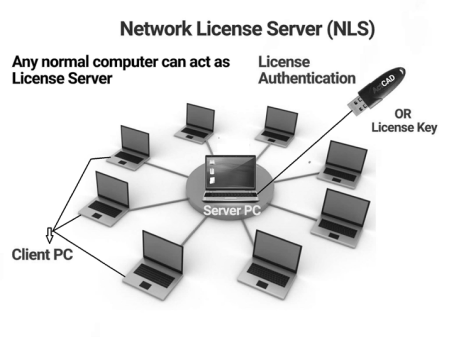
ACTCAD licenses that can be activated for your premise LAN network. One License will work on any one computer in the network at a given point of time. Any regular computer can be used as ActCAD Network License Server.

How does it work?

Allows License Floating between LAN connected computers.

One NFL (Network Floating License) can be used at one time by any ACTCAD user on the Client LAN network.

If ACTCAD is closed on one client machine, the license will be transferred back to the ActCAD Network License Server (NLS) and it can be used by another machine on the client network.

NLS can be activated using either License Keys or USB Dongle.

Who is it useful for?

Small Businesses / Enterprises with in-office CAD users.

What is it?

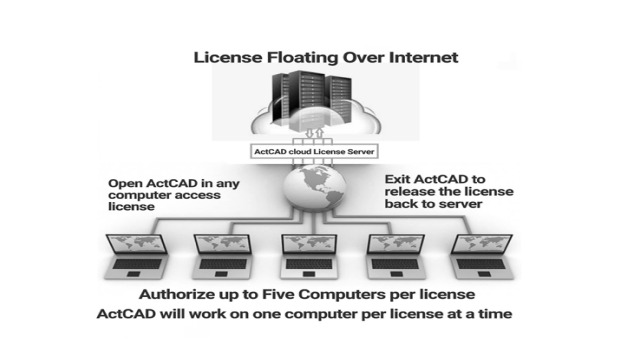
ACTCAD licenses that can be activated through the ACTCAD Cloud License Server (CLS) for Client’s remote / hybrid CAD users.

How does it work?

Allows Client’s machines to share ACTCAD licenses over the internet.

Customer can authorize upto Five (5) machines to access one (1) ActCAD Live License.

ACTCAD will work on one machine at a given point of time per License.

License will transfer automatically between our cloud server and user computer over internet.

No activation/deactivation needed for the software.

Who is it useful for?

Small Businesses / Enterprises with hybrid team of CAD users.

Microsoft Windows 10/11

2GHz & Above (64-bit architecture)

4Gb (8Gb or above is highly recommended)

10GB Free Space

Open GL 2.0 & above

HD Monitor for better Graphics Display

Annual Maintenance Support

best choice for a better cost saving

What is it?

ActCAD Annual Maintenance Support is not compulsory but highly recommended for all CAD users who needs continuous live support and keeping up-to-date with latest release all the time within the active subscription period.

What's included?

1-year priority technical support assistance - Live Chat / Ticketing / Email / Remote Support.

FREE UPGRADE to the next major ActCAD releases.

Guided ActCAD software updates.

How does it work?

Maintenance can be only purchased together with license(s).

To continuously enjoy Maintenance benefits, user need to subscribe annually, which may also help users to save huge cost on the licensing upgrades and support, for a long term.

Who is it useful for?

Any CAD users how need assistance on technical support and services.

Fill in the form to apply as Dealer

This information is required if you've sold to your customers and/or source the supply from the supplier/provider/reseller/distributor, in order to protect relevant party interest and relationships.

The above is only your estimation based on your past experience in relevant work scope. You may refer the above target in the Agreement, if you feel the target is inappropriate or not within your capacity.